
The most common answer to this question is because non-linear effects (e.g. compression-only supports) are not active in load cases, but are active in load combinations.
As a result, supports or connections that should release in tension/compression will still behave linearly in load case results, leading to seemingly incorrect forces.
Why this happens
In FEM-Design non-linear behaviour can be considered for supports (e.g. uplift), connections and truss members (e.g. tension-only). The analysis types where non-linearity is included are Load combinations, Imperfections and Stability.
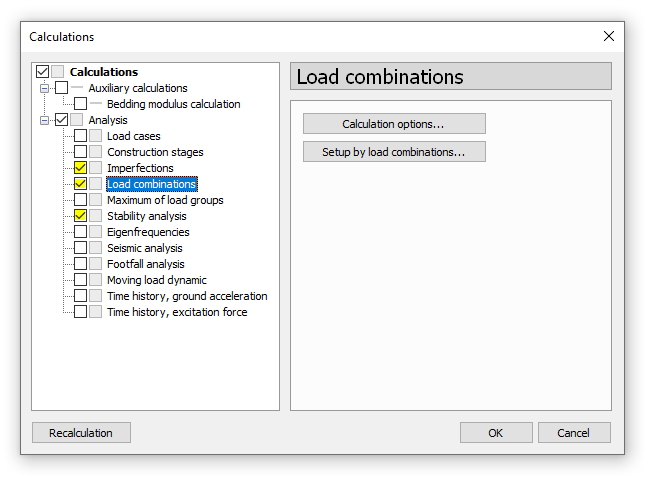
Figure 1. Analysis types that include non-linear effects.
To enable non-linear effects, select the “NLE” checkbox at Calculations > Analysis > Load combinations > Setup by load combinations.
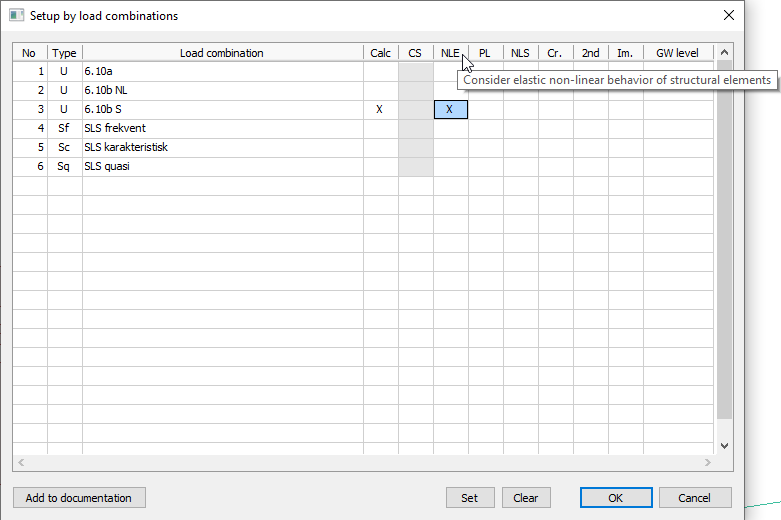
Figure 2. How to activate non-linear effects.
Since these non-linearities are not in effect for the results of Load cases, non-linear results must be viewed in Load combinations.
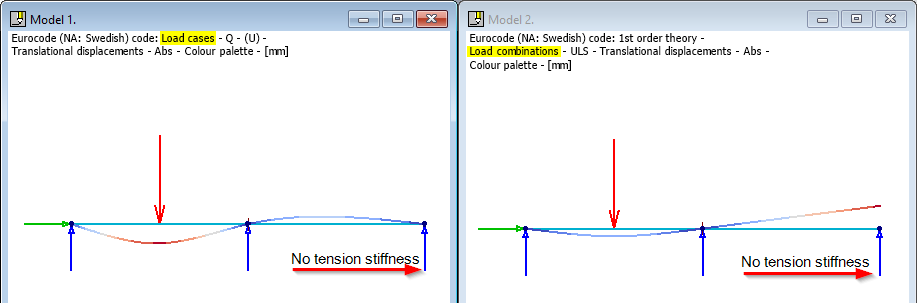
Figure 3. Non-linear support ineffective in Load cases (left), so tension is not released. In Load combinations (right), the non-linear behaviour is active and the results match the intended support condition.