
If the analysis stops during stiffness matrix factorization with “Stiffness matrix is singular”, it is usually a warning sign that the model is not properly restrained, contains rigid body motion, or includes releases or connections that allow unintended movement. In some cases, fictitious bars are involved, but the underlying issue is typically related to stability, connectivity, or boundary conditions rather than the bar type alone. This article explains the most common causes and the fastest checks to make first.
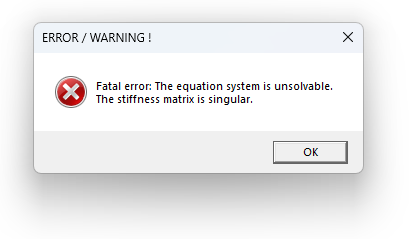
Figure 1. Example of the “Stiffness matrix is singular” error message shown in FEM-Design.
Quick overview: Symptoms, cause, solution
- Symptom: FEM-Design stops with the message “Stiffness matrix is singular”.
- Cause: The model may contain rigid body motion, missing stabilization, incorrect releases, or connectivity issues that make the global stiffness matrix singular or too poorly conditioned to solve reliably.
- Solution: Check restraints, releases, fictitious bar settings, point-to-point connections, and overall connectivity, then verify the model with eigenfrequency analysis. If the model only works because of numerical stabilization, the results may still be unreliable.
Ideas for investigating the issue
Check whether the model has restraints in all necessary directions, whether any releases allow unintended movement, whether point-to-point connections or general connectivity need review, and whether an eigenfrequency analysis indicates rigid body motion.
What does “Stiffness matrix is singular” usually mean?
This error does not always mean that the whole model is unstable, but it usually indicates that the solver has detected a structural inconsistency that needs attention. In many cases, the model is insufficiently restrained, contains rigid body motion, or includes releases or connections that allow unintended movement. Fictitious bars can be involved in some cases, especially if their end releases or role in the structural system contribute to the problem, but they should not be treated as the automatic root cause.
FEM-Design uses soft springs to numerically stabilize models when possible, especially in nonlinear analysis. This can help some borderline cases run, but it does not remove the underlying modelling issue. If the model is not properly restrained, or if releases and connections still allow unintended movement, the solver may stop with a singular stiffness matrix error—or it may run but still produce results that should be treated with caution.
Common causes of a singular stiffness matrix
- Missing support or insufficient restraint in one or more directions
- Rigid body motion, even if it is not obvious from the model at first glance
- Incorrect releases, for example on fictitious bars, that allow unintended rotation or movement
- Connectivity issues, including point-to-point connections or other boundary-condition details that make parts of the structure behave inconsistently
How to solve “Stiffness matrix is singular”
Quick checklist
- Check that the model is restrained in all necessary directions and that no rigid body motion is possible.
- Run an eigenfrequency analysis (without the 90% reach option). This is often a practical way to detect rigid body motion. If the first period becomes extremely large, for example on the order of thousands of seconds, that is a strong sign that the model still contains rigid body motion.
- Review releases on fictitious bars and other elements. In particular, check whether any end releases allow free rotation or movement that is not intended in the real structural system.
- Review connectivity between structural elements, including point-to-point connections and any local modelling details that may leave parts of the structure insufficiently restrained.
- If the error disappears after changing a release or support condition, do not assume the issue is fully solved. Recheck the model with eigenfrequency analysis and confirm that the first periods are within a realistic range.
Example: fictitious bars and missing horizontal support
In one support case, a model failed when two supporting elements were modelled as fictitious bars but worked when the same elements were changed to ordinary beams. The underlying issue was not the bars alone, but that the 3D model had no effective horizontal restraint, which allowed rigid body motion. In that situation, the solver could sometimes pass depending on how the matrix was conditioned, but the behaviour was not reliable. Once horizontal stabilization was added, the model could be solved in a consistent and reliable way in FEM-Design.
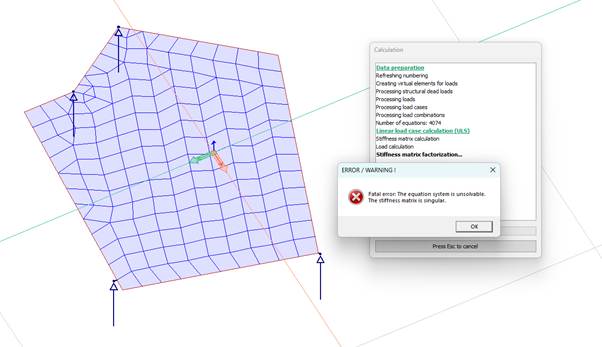
Figure 2. Example model with short fictitious bars and insufficient stabilization, where only vertical point supports are defined.
Rule of thumb: treat this message as a warning sign, not just as an isolated solver failure. Start by checking restraints, releases, fictitious bar settings, point-to-point connections, and general connectivity. If the solver only succeeds because of numerical stabilization, the model may still contain structural inconsistencies and the results should be reviewed carefully.
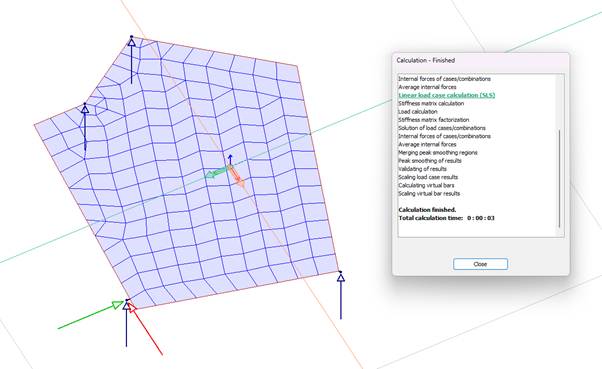
Figure 3. Example of the same model after horizontal stabilization has been added, allowing the analysis to run consistently.
Even if the singular stiffness matrix message disappears after changing a release, support, or fictitious bar setting, the model may still contain rigid body motion or other instability. A follow-up eigenfrequency analysis is therefore a useful validation step. If the first period is still unrealistically large, the model likely remains insufficiently restrained.
Still having trouble?
If the issue remains after the checks above, you are always welcome to contact our support team. Please feel free to attach your model file and include a short note about which load case or design step triggers the error.