
This article explains how the result types Maximum of load combinations and Maximum of load groups work in FEM-Design when you want to study envelope results for shell internal forces. The Simultaneous setting determines which result component is displayed in the load combination or load group where the selected extreme value occurs.
How does the Simultaneous setting work?
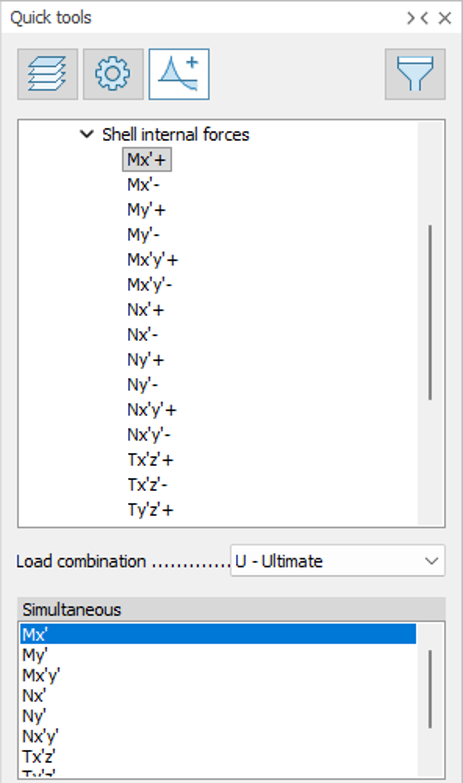
When you display results from Maximum of load combinations, you first choose which result component should control the selection, for example Mx’+ or My’-. The value in the Simultaneous field then determines which result component is displayed in the load combination where the controlling result reaches its maximum or minimum.
This means you can use the same selection either to view the result component that reaches the extreme value itself, or to view a different component that occurs simultaneously in the same load combination.
Examples
If you want to see the largest positive value of Mx’, select Mx’+ and set Simultaneous = Mx’. The envelope then shows Mx’ in the load combination where Mx’ is at its largest.
If instead you want to see My’ in the load combination where Mx’ is at its largest, select Mx’+ and set Simultaneous = My’. The result then shows My’ simultaneously with the largest positive value of Mx’.
Similarly, if you want to see the largest positive value of My’, select My’+ and set Simultaneous = My’. If you want to see the minimum value, that is the most negative value, of My’, select My’- and set Simultaneous = My’.
Practical rule of thumb
In most cases, you should select the same result component in Simultaneous as the one you use to identify the extreme value. This gives you the most direct answer to questions such as: What is the largest moment in the x- or y-direction?
If, however, you want to understand the relationship between different internal force components, you can select a different result component in Simultaneous to see its value in the same load combination.